Free & open source · self-hosted email relay
The email relay you
host yourself.
Dispatch is a self-hosted mail relay for your applications and devices. Take SMTP or HTTP mail, spool every message durably, then forward it to any provider — with a live dashboard, and nothing phoning home.
Apache-2.0 licensed · v0.7.2 · Windows, Linux, Docker & VM
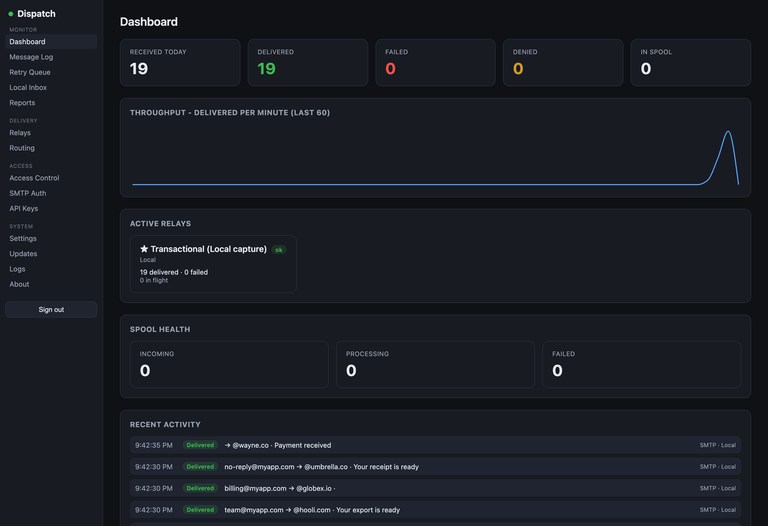
How a relay earns its keep
Three moves: mail comes in over a protocol your apps already speak, it is spooled somewhere durable, and it goes out through whichever provider you point at.
01
Send it in
Point apps, devices, and mailbox rules at Dispatch over SMTP (25 / 587 / 2525, STARTTLS) or its Mailgun-compatible HTTP API with per-key tokens.
02
It spools durably
Dispatch answers 250 OK straight away and holds the message in a local queue, retrying with back-off. A provider or database blip costs you nothing.
03
It delivers out
Each relay chooses its own provider — REST or SMTP — so switching providers never means touching your apps. Watch it happen in the dashboard.
A dozen providers, one relay
Swap between providers per relay without touching your apps. CC/BCC, attachments, and custom headers everywhere.
- Mailgun
- SendGrid
- Amazon SES
- Postmark
- Resend
- SparkPost
- SMTP2GO
- Maileroo
- Bird
- Azure
- any SMTP host
Local Inbox: see what your app really sends
Test what your app actually sends without delivering anything. Set the relay to Local and inspect every message — subject, headers, To/Cc/Bcc, rendered HTML & text, and attachments — right in the dashboard. A built-in mail trap, no third-party service.
No call home
No telemetry, no analytics, no update pings. It only connects to the providers you configure.
Two ways in
SMTP (25 / 587 / 2525, STARTTLS) or a Mailgun-compatible HTTP API with per-key tokens.
Ports reference →Durable spool
Instant 250 OK to a local queue — mail keeps flowing even if the database is down. Auto-retry with back-off.
Health & metrics →Deploy anywhere
Windows & Linux installers (bundled SQL), a multi-arch Docker image, or a ready-to-import virtual appliance.
Get a build →Message features
CC/BCC, attachments, custom headers, per-relay credentials, and full message history you keep on your own disk.
Message features →Questions people actually ask
What does a self-hosted email relay do?
A relay sits between your applications and whichever provider actually delivers the mail. Your apps send to the relay over SMTP or an HTTP API, the relay accepts the message immediately, and it forwards it to a provider you configured. Hosting it yourself keeps the credentials, the queue, and the logs on your own infrastructure.
Is Dispatch free?
Yes. Dispatch is free and open source under the Apache-2.0 license. There is no paid tier, no license key, and no account required — the source and every release asset are on GitHub.
Which providers can Dispatch send through?
Mailgun, SendGrid, Amazon SES, Postmark, Resend, SparkPost, SMTP2GO, Maileroo, Bird, Azure, or any SMTP host. Providers are set per relay, so the same instance can route different apps to different providers.
What happens if my provider is down?
Dispatch answers 250 OK as soon as it accepts the message and keeps it in a durable local spool, then retries with back-off until the provider takes it. Mail keeps flowing while the provider is unreachable, and the queue survives a database restart.
Does Dispatch phone home or collect telemetry?
No. There is no telemetry, no analytics, and no update ping — a running instance only connects to the providers you configure. Checking for updates is something you do, in the dashboard.
Can I test what my app sends without actually emailing anyone?
Set a relay to the Local provider and Dispatch stores messages instead of delivering them. The dashboard shows the subject, headers, To/Cc/Bcc, rendered HTML and text, and attachments — a built-in mail trap, with no third-party service in the loop.
Does the mail relay need a database server?
No. The Windows and Linux installers, the Docker image, and the virtual appliance all default to a bundled SQLite file. If you already run PostgreSQL, MariaDB/MySQL, or SQL Server, you can point Dispatch at that instead.
Keep your mail on your infrastructure.
Free, open source, self-hosted, and yours to run.